Oracle Fusion HCM - Changes in Oracle Fusion Cloud Applications Sign In Page
This change is a result of the upgrade to OCI Identity and Access Management
Oracle Fusion Cloud Applications has undergone several updates and changes to enhance user experience, security, and accessibility. One of the key updates in recent versions is related to the Sign-In Page, which has seen a number of improvements. Here's an overview of the changes:
1. New and Improved Sign-In Page Design
Modern UI: The sign-in page has been updated with a more modern, clean design, offering a user-friendly interface. The layout is simplified, focusing on ease of access and improving the overall user experience.
Responsive Design: The sign-in page is now responsive, meaning it adjusts seamlessly across different devices (e.g., desktop, tablet, mobile), ensuring a smooth user experience regardless of the device being used.
2. Enhanced Security Features
Single Sign-On (SSO): Oracle continues to support and improve SSO (Single Sign-On) integration, enabling users to access all Oracle Cloud services using one set of credentials. This reduces the need for multiple logins and streamlines the access process.
3. Oracle Identity Cloud Service (IDCS) Integration
Seamless Identity Management: Oracle Fusion Cloud applications are now fully integrated with Oracle Identity Cloud Service (IDCS), which centralizes user authentication and role management across Oracle applications.
Self-Service Password Reset: The IDCS integration provides an option for users to reset their passwords or unlock their accounts directly from the sign-in page without the need for administrator intervention.
4. User-Friendly Features
Forgot Password Link: Users now have a clearer, more accessible link to reset their password or retrieve login information.
Language Preferences: The sign-in page has enhanced language preferences, allowing users to select their preferred language for the sign-in process, which is particularly helpful for global organizations.
Multiple Tenants: If your organization uses multiple Oracle tenants, users can easily switch between different environments (e.g., production, development, or testing) from the sign-in page.
| Federated SSO Before Upgrade | Federated SSO After Upgrade |
|---|---|
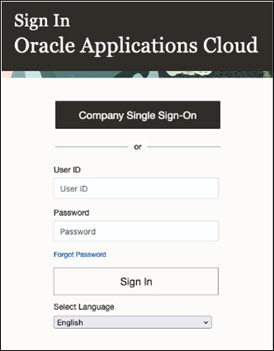 | 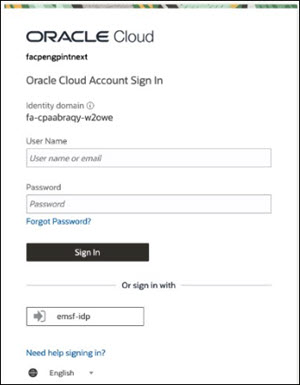 |
This is how the Sign In page for non-federated SSO users looks before and after the identity upgrade.
| Non-Federated SSO Before Upgrade | Non-Federated SSO After Upgrade |
|---|---|
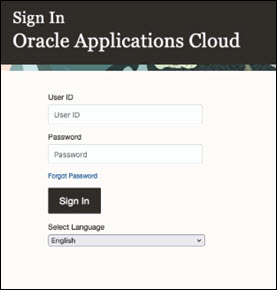 | 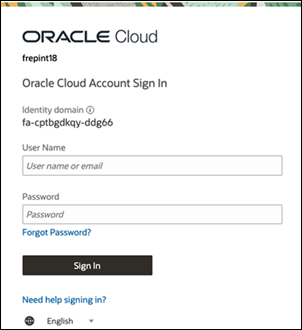 |

Comments
Post a Comment