🌿 HCM Redwood Applications: Default & Validate Fields
🌿 HCM Redwood Applications: Default & Validate Fields
🎯 Purpose
Enhance user experience in Oracle Fusion HCM Redwood pages by implementing autocomplete rules for:
Defaulting values automaticallyValidating entries with warnings or errors
🧠 What You Can Do
Using Business Rules, you can:
Automatically populate default field valuesApply custom validations (e.g., data format, dependencies)
Show warning or error messages based on logic
📌 Supported Functional Areas, Pages, and Regions
🔹 Global Human Resources (GHR)
Person Details:
Contact InfoFamily and Emergency Contacts
Identification Info
Personal Details
Person Identifiers for External Applications
Employment Details:
When and WhyNational Identifier
Biographical Info
Phone, Email, Address
Citizenship, Passports, Visas, Driver’s License
Assignment
Additional Assignment Info
Payroll
Salary & Salary History
Individual Compensation
Employment Actions:
Add AssignmentAdd Contingent Worker
Add Nonworker
Add Pending Worker
Change Assignment (with more use cases)
Change Location
Change Working Hours
Convert Pending Worker
Correct Employment Details (expanded use cases)
Create Work Relationship
Edit Pending Worker
Hire an Employee
Local and Global Transfer
Promote
Resignation
Termination (excluding Correct Termination)
Transfer
💰 Compensation
Change Salary (for Line Manager and HR Specialist)Salary History
Individual Compensation (including Personal Contributions)
Administer Compensation
👥 Recruiting
Create Job RequisitionJob Requisition
🌟 Talent Review & Succession
Talent Review TasksSuccession Plan – External Candidates
🧠 Key Terms for Using Autocomplete in Redwood Pages
🔄 Autocomplete (Generic Term)
Definition: A generic concept that covers the ability to default and validate field values across Oracle HCM.Applies to: Both Autocomplete Rules (Design Studio) and Business Rules (VB Studio).
🧱 Autocomplete Rules (Design Studio)
Location: Found in HCM Experience Design StudioFocus: Object-based personalization
Used for: Defaulting and validating field values in responsive pages
Key use: Typically used in classic responsive flows (pre-Redwood)
💼 Business Rules (VB Studio Express Mode)
Location: Created using VB Studio in Express ModeFocus: Page-based personalization
Used for: Defaulting and validating field values in Redwood pages
New in: Release 24B
Key advantage: Works within modern Redwood UI pages and supports broader personalization options
🔍 Field Value Concepts
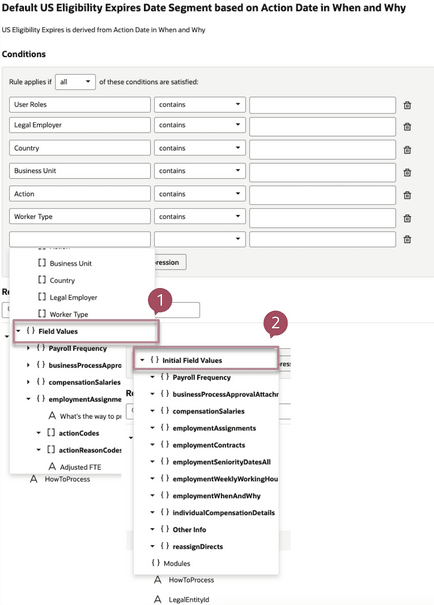
1. Initial Field Value
Definition: The original value stored in the database before the transaction.Properties:
Does not change during the transaction.Read-only during runtime.
Useful for comparison logic (e.g., detect changes).
Note: Initial values are region-specific. Example: available in assignment regions but not in salary regions in Change Employment processes.
2. Field Value
Definition: The current (cached) value on the page.Can be:
Set by a ruleEntered or changed by the user
Used for: Applying dynamic conditions or default values in real-time
👤 Person Page – Defaulting and Validation Capabilities
📌 Name
✅ Validation:
Enforce field length limits
Prevent special characters
🌍 National Identifiers (NID)
✅ Defaulting:
Set NID Country default to United States (US)
🎂 Biographical Info
✅ Validation:
Check that person age is valid (e.g., not negative, realistic)
📞 Phone
✅ Validation:
Phone number must be numeric only
Phone number must be exactly 8 digits
✅ Validation:
Enforce proper email format
Should contain "@" and ".com"
Error if missing
🏠 Address
✅ Validation:
Enforce field length limits
Prevent special characters
🌐 Citizenships
✅ Defaulting:
Citizenship status set to Active
✅ Validation:
Allow updates only if From Date is not in the future
🛂 Passports
✅ Validation:
Issue date must not be in the future
🛃 Visas and Permits
✅ Defaulting:
Set place of issue based on Descriptive Flexfield (DFF) value
✅ Validation:
Require visa issue date
Visa expiration date must be blank (in this case logic)
🚗 Driver's License
✅ Validation:
Format the license number based on country-specific rules
👨👩👧👦 Family and Emergency Contacts – Create New Contact
✅ Validation:
Phone number must be provided
National identifier required when a contact is added
🛠️ Family and Emergency Contacts – Edit Contact
✅ Validation:
Flag if relationship type is changed
🧩 Person Identifiers for External Applications
✅ Defaulting:
Generate identifier using a constant value + person number
✅ Validation:
Error if specific external identifier is modified
This table lists the supported regions and pages.
Region Page* Defaulting Support Validation Support Name (4) ❌ No ✅ Yes National Identifiers (2), (4), (6), (7), (8), (9) ✅ Yes ✅ Yes Biographical Info (2), (4), (6), (7), (8), (9) ✅ Yes ✅ Yes Disability Info (4) ✅ Yes ✅ Yes Phone (1), (2), (6), (7), (8), (9) ✅ Yes ✅ Yes Email (1), (2), (6), (7), (8), (9) ✅ Yes ✅ Yes Other Communications (1), (2) ✅ Yes ✅ Yes Address (1), (2), (6), (7), (8), (9) ✅ Yes ✅ Yes Citizenship (2), (3), (6), (7), (8), (9) ✅ Yes ✅ Yes Passports (2), (3), (6), (7), (8), (9) ✅ Yes ✅ Yes Visas and Permits (2), (3), (6), (7), (8), (9) ✅ Yes ✅ Yes Driver's License (2), (3), (6), (7), (8), (9) ✅ Yes ✅ Yes Family and Emergency Contacts – Create New Contact (2), (6), (7), (8), (9) ✅ Yes ✅ Yes Family and Emergency Contacts – Create Coworker as Contact (2) ✅ Yes ✅ Yes Family and Emergency Contacts – Edit Contact (2) ✅ Yes ✅ Yes Person Identifiers for External Applications (20) ✅ Yes ✅ Yes
👤 Employment Page
🔧 Defaulting and Validation Capabilities by Page
✅ Add Assignment
Defaulting:
Union member based on bargaining unit
Assignment DFF when position is changed
Validation:
Assignment context-sensitive DFF has 4 numeric fields; sum must be 100 or 0
Permanent/Temporary field aligns with person type
✅ Add Person / Hire / Convert / Edit Pending Worker
Defaulting:
Projected end date = 12 months from start
Grade defaults to last known grade if rehired within 1 year
Validation:
Business title = ASCII characters only
Proposed start date ≤ next 3 months
✅ Change Assignment
Defaulting:
Department from another field
Action value from "When and Why" section to "Additional Assignment Info"
✅ Change Working Hours
Defaulting:
Action = first date of the month
If FTE < 1: Assignment Category = Part Time Regular; Full/Part Time = Part Time
If FTE = 1: Assignment Category = Full Time Regular; Full/Part Time = Full Time
Validation:
Weekly frequency: working hours ≤ 40
FTE must not exceed 1
✅ Change Location
Defaulting:
Action name to descriptive flexfield
Specific value in EFF in Additional Assignment Info
Validation:
No changes allowed on Sunday
Country must remain the same
✅ Correct Employment
Validation:
Location change not allowed
Action reason restriction enforced
✅ Create Work Relationship
Defaulting:
Enterprise seniority date from most recent employee record or action date
Job, assignment category, hourly/salaried, FTE, working hours for primary assignment
Validation:
Restrict hourly rehire within 13 weeks of salaried termination unless valid exceptions
For Jobstudents: minimum 1-month gap between contracts
✅ Local and Global Transfer
Defaulting:
Reporting establishment based on location EFF
Work at Home = Yes/No based on Work Arrangement DFF
Validation:
Assignment Name/Business Title ≤ 50 characters
Legal employer and department must match
✅ Transfer
Defaulting:
Transfer date = 1st of the month
Notice period = 60 days based on action
Validation:
No transfers on Sundays
Country must remain unchanged
✅ Promote
Defaulting:
Grade based on job
Assignment category based on Full/Part Time
Validation:
Promotion date must be start of payroll cycle
Handle retroactive promotions for managers
✅ Resignation
Defaulting:
Rehire recommendation = Yes
Assignment status based on action and reason
Validation:
Future resignation ≤ 90 days
Remarks ≤ 100 characters
✅ Termination
Defaulting:
Rehire recommendation = Yes
Revoke User Access = 'Immediately' if Involuntary Termination
Validation:
Only valid action for contingent workers
No termination during leave of absence
✅ Payroll
Defaulting:
Payroll based on legal employer & payment type (salaried/hourly)
Timecard requirement & overtime period based on job
Payroll based on location
Validation:
Timecard required must align with business unit
Payroll must match legal employer
✅ Salary
Defaulting:
Salary basis for full-time US employees with specific grade
Validation:
Date must not be in the past
✅ Individual Compensation
Defaulting:
Award "When Date" = 1st of next quarter
Validation:
"When Date" must fall within current fiscal year (1 Apr – 31 Mar)
Page When and Why Assignment Additional Assignment Info Payroll Salary* Individual Compensation ** D V D V D V D V D V D V Add Assignment Yes Yes Yes Yes Yes Yes Yes Yes Yes Yes No Yes Add a Contingent Worker Yes Yes Yes Yes Yes Yes Yes Yes Yes Yes No Yes Add Nonworker Yes Yes Yes Yes Yes Yes Yes Yes Yes Yes No Yes Add a Pending Worker Yes Yes Yes Yes Yes Yes Yes Yes Yes Yes No Yes Change Assignment Yes Yes Yes Yes Yes Yes Yes Yes Yes Yes No Yes Change Location Yes Yes Yes Yes Yes Yes Yes Yes Yes Yes No Yes Change Working Hours Yes Yes Yes Yes No No Yes Yes Yes Yes No Yes Correct Employment Details Yes Yes Yes Yes Yes Yes N/A N/A Yes Yes No Yes Create Work Relationship Yes Yes Yes Yes Yes Yes Yes Yes Yes Yes No Yes Convert Pending Worker Yes Yes Yes Yes Yes Yes Yes Yes Yes Yes No Yes Edit Pending Worker Yes Yes Yes Yes Yes Yes Yes Yes Yes Yes No Yes Hire an Employee Yes Yes Yes Yes Yes Yes Yes Yes Yes Yes No Yes Local and Global Transfer Yes Yes Yes Yes Yes Yes Yes Yes Yes Yes No Yes Promote Yes Yes Yes Yes Yes Yes Yes Yes Yes Yes No Yes Resignation Yes Yes Yes Yes Yes Yes N/A N/A No No No No Termination, (except Correct Termination) Yes Yes Yes Yes Yes Yes N/A N/A No No No No Transfer Yes Yes Yes Yes Yes Yes Yes Yes Yes Yes No Yes 👤 Salary Page
Change Salary for Line Manager and HR Specialist:
Defaulting Rules:
Proposed Salary Basis:
Default the proposed salary basis when the employee's legal employer is Vision when line managers propose a salary change.
Effective Date:
Default the effective date to the current date when line managers propose a salary change.
Next Salary Review Date:
Default the next salary review date to 1 year after the effective date when line managers propose a salary change.
Salary Basis from Assignment Flexfields:
Default the salary basis based on the assignment flexfields when line managers propose a salary change.
Salary Basis for Full-Time Employees:
Default the salary basis for a full-time employee in the US based on the employee's grade.
Validation Rules:
Effective Date:
Validate that the effective date is not in the past.
Salary Amount:
Validate that the salary amount is not below a minimum value.
Start Date Validation:
Validate that the start date is not set to 1st of the next month.
Rate Component Validation:
Validate that the user hasn't changed the rate component value during the salary change process.
Salary History:
Defaulting Rules:
Proposed Salary Basis:
Default the proposed salary basis based on the employee's legal employer when compensation managers propose a salary change.
Effective Date:
Default the effective date to the first day of the next month when line managers propose a salary change.
Next Salary Review Date:
Default the next salary review date to 1 year after the effective date when line managers propose a salary change.
Validation Rules:
Retro-active Salary Changes:
Validate that retro-active salary changes are not allowed (i.e., users cannot enter retroactive salary changes).
First of the Month for Salary Changes:
Validate that salary changes occur on the first of the month.
Salary Amount:
Validate that the salary amount is above a minimum value.
Business Benefits of Defaulting and Validation in These Areas:
Consistency: Ensures salary changes follow company policies (e.g., timing, minimum salary limits).
Accuracy: Prevents errors by enforcing rules on salary changes (e.g., validation on rate components and start dates).
Efficiency: Reduces manual intervention by automating the population of default fields such as salary basis, effective date, and salary review dates.
👤 Recruiting Page
Defaulting Rules:
Business Justification:
Default the business justification based on the recruiting type.
If the recruiting type is contingent, default the business justification to Extension.
Hiring Manager and Recruiter Fields:
Default the Hiring Manager and Recruiter fields based on the value in the business justification.
If the recruiting type is modification, default:
Hiring Manager field to "Jacob Smith".
Recruiter field to "Bernardo Bruno".
Requisition Posting:
Default the values of "Automatically Fill Requisition" and "Allow Candidates to Apply When Not Posted" to Y when creating a requisition.
Apply Flow Based on Country:
Default the Apply flow in the Configuration section based on the country in the primary location under the requisition structure section when creating the requisition.
Worker Type:
Default the worker type based on the recruiting type.
Compensation Currency:
Default the compensation currency field based on the location entered as the primary location (e.g., if the location is in the United States, default to USD).
Organization Field:
Default the "Organization" field in the requisition structure section based on the Business Unit.
Validation Rules:
Organization Validation:
Validate that if the Organization field contains "United", display a warning: "Select a different value".
Business Justification Validation:
Validate that if the requisition is created using a position (field USE) and the selected business justification is Modification, display a warning: "Use either New position or Replacement in business justification field".
Requisition Title Validation:
Validate that if the Requisition title is the same as the Position Name, display a warning: "Modify the requisition title as it cannot be same as Position name".

Comments
Post a Comment